


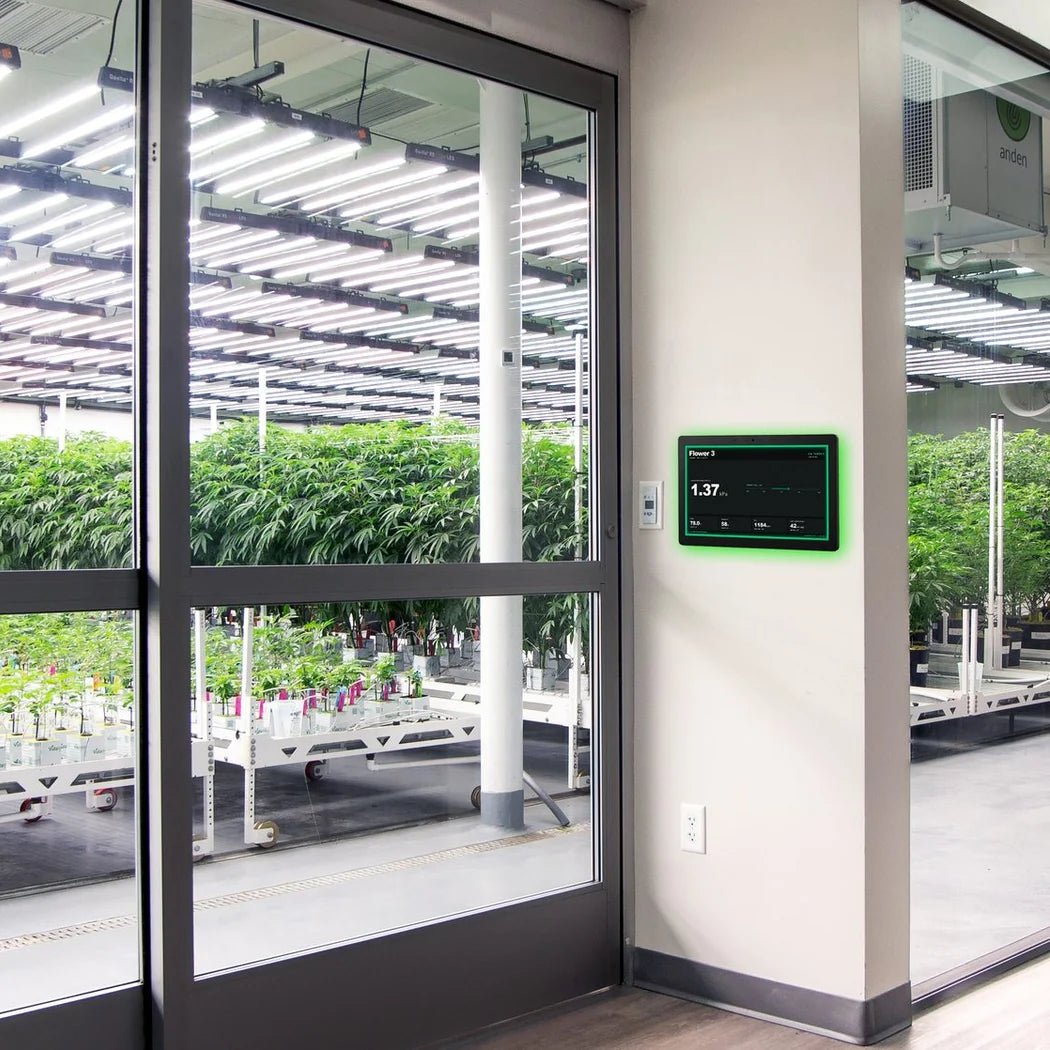
Growlink displayLINK Room Dashboard Puts Live Room Data on the Hallway Wall
 The Growlink displayLINK is a 15.6-inch, always-on touchscreen panel that gives each grow room its own wall-mounted view of the Growlink platform. The screen runs 1920 × 1080 Full HD with 10-point capacitive touch, so anyone on the crew can tap between views without a laptop. Temperature, humidity, VPD, leaf VPD and CO₂ sit beside their setpoints, with 24-hour trend lines underneath. The irrigation view adds substrate water content, root zone EC, shot history and dryback percentage, the numbers that steer a fertigation strategy. A continuous LED ring around the bezel glows green on target, amber when a value drifts and red when action is needed. It turns purple when Nova has a recommendation waiting. That ring reads from across a hallway. Power and data travel down a single RJ45 cable over PoE, and the included DC adapter covers walls without a PoE port. Connectivity runs on Wi-Fi 6, Bluetooth 5.3 and Ethernet. The panel also carries onboard temperature, humidity and ambient light sensing, a 5 MP camera, a 4-mic array and two 2 W speakers. At 13.6 mm thick it sits close to the wall, mounted on a vertical double-gang box with the supplied Bracket U. One trade-off is worth knowing: the onboard sensor reads hallway air and some panel heat, so its numbers will not match the room. The dashboard itself shows room conditions from the Growlink sensors assigned to that room.
A Grow Room Panel the Crew Reads Before Opening the Door
 Placement decides how long this grow room panel lasts. Growlink's guidance is the hallway wall beside the room entry, at eye level, never inside the grow room itself. Grow room humidity and wash-down shorten the panel's life, and HVAC discharge or nearby irrigation lines are just as hard on it. Mounted at the door, it changes the walk-in routine. The crew checks the ring, reads the room state and knows what is waiting before they gown up. When a value wanders off target, Nova surfaces what to do and why, from a canopy adjustment to irrigation timing or an environmental correction. Nobody needs a login or a laptop to get that answer. Managers build custom dashboards, camera feeds or recipe views in the Growlink Builder and push them to any displayLINK in the facility with one click. That lets each room's panel show the screen its crew actually uses. The rear terminals go further than a display usually does. A relay switches an external circuit, digital I/O takes door switches or alarm inputs, and the serial port handles RS-485 or RS-232 hardware. Terminal wiring belongs to qualified personnel, with circuits de-energized and local code followed. Setup takes a few minutes: power on, join the network, sign in to your Growlink account and assign the panel to a room. It is a window onto Growlink data rather than a standalone controller, so it earns its place in rooms already running Growlink sensors.
Key Features
- 15.6" Full HD Touchscreen: A 1920 × 1080 display with 10-point capacitive touch keeps setpoints, trends and alerts legible from the doorway.
- Climate at a Glance: Temperature, humidity, VPD, leaf VPD and CO₂ show against target with 24-hour trends, so drift stands out early.
- Irrigation and Substrate View: Water content, root zone EC, shot history and dryback percentage stay visible for crop steering decisions.
- LED Status Ring: Green, amber, red and purple broadcast room health and Nova recommendations to anyone walking the hallway.
- Nova AI on the Wall: Nova explains what changed in the room and what to do next, answered from live Growlink data.
- One-Cable PoE Install: A single RJ45 cable carries power and data, with the included DC adapter as the alternative over Wi-Fi 6 or Ethernet.
- Build Once, Cast Everywhere: Dashboards, camera feeds and recipe views built in the Growlink Builder push to any displayLINK in the facility.
- Onboard Sensing and Audio: Temperature, humidity and light sensing, a 5 MP camera, a 4-mic array and two 2 W speakers ride inside the bezel.
- Built-In I/O: A relay, two-channel digital I/O, RS-485/RS-232 serial, an external IR receiver port and USB-C OTG tie in door switches, alarms and room hardware.
- Low-Profile Hallway Mount: The 13.6 mm panel hangs on Bracket U over a vertical double-gang box, with Bracket C included for a 2-point mount.
Technical Specifications
| Specification | Value |
|---|---|
| Display & Software | |
| Brand / SKU | Growlink · GL-LINK-DISPLAY |
| Display | 15.6" LCD, 1920 × 1080 Full HD, 16:9 |
| Touch | 10-point capacitive |
| Software | Android + Growlink panel app, Nova AI built in, Builder apps full-screen |
| Connectivity & Power | |
| Network | Wi-Fi 6 (802.11a/b/g/n/ac/ax), Bluetooth 5.3, RJ45 Ethernet |
| Power | PoE or included DC adapter |
| Inputs & Outputs | |
| Relay / Digital I/O | 1 × relay (1 / COM / 2) · 2-channel digital I/O |
| Serial / IR / USB | RS-485, RS-232 · external IR receiver port · USB-C OTG |
| Specification | Value |
|---|---|
| Sensing & Audio | |
| Onboard Sensors | Temperature, humidity, ambient light, 5 MP camera |
| Audio / Status | 4-mic array, 2 × 2 W speakers · RGB LED ring |
| Physical | |
| Panel (W × H × D) | 14.30 × 8.90 × 0.54 in (363.25 × 225.99 × 13.6 mm) |
| Depth with Housing | 1.50 in (38.15 mm) |
| Mounting | Bracket U on a vertical double-gang box; Bracket C included |
| Package / Weight | 15.5 × 10.25 × 3 in · 6.5 lb (2.95 kg) |
| Environment & Support | |
| Operating | 32–104 °F (0–40 °C), 20–80% RH |
| Storage | -4–140 °F (-20–60 °C) |
| Compliance / Warranty | FCC Part 15 Class B, CE, WEEE · 1 year |
| In the Box | Panel, power adapter, Bracket U, Bracket C, screws, user manual |

FAQs
How is the Growlink displayLINK powered?
Power over Ethernet carries power and data on one RJ45 cable from a PoE switch port or injector. The supplied DC adapter is the alternative, with the panel joining the network over Wi-Fi or Ethernet.
Where should the displayLINK be mounted?
Mount it on the hallway wall beside the room entry, at eye level, on a double-gang box installed vertically. Keep it out of the grow room and away from HVAC discharge, irrigation lines, spray and condensation.

Does the panel need Growlink sensors in the room?
Yes, the dashboard displays room conditions from the Growlink sensors assigned to that room. The onboard sensor reads hallway air and panel heat, so expect its readings to differ from the room sensors.
What is Nova AI on the Growlink displayLINK?
Nova is Growlink's AI agent, built into GrowlinkOS and into the panel software. It reads the live climate and substrate data from your Growlink sensors and turns it into plain-language answers on the wall.
How does Nova AI help growers day to day?
Nova compares rooms, spots drift from Blueprint targets and flags which decisions improved performance. It summarizes results across rooms, cultivars and cycles, so the crew spends less time digging through dashboards, notes and reports.
What kind of questions can I ask Nova?
Ask it why a room underperformed this cycle, which rooms drifted from Blueprint or what changed before yield dropped. A typical answer pinpoints hours of VPD drift in late flower and suggests reviewing dryback strategy or P3 shot timing.
What Nova AI Does for Growers
Nova is Growlink's AI agent, built into GrowlinkOS and running on every displayLINK panel. It reads the same live climate and substrate data your sensors already send, then compares each room against its Blueprint targets. Ask it in plain language why a room underperformed, which rooms drifted or what to adjust, and it answers from your own data. A typical answer pinpoints the hours VPD drifted during late flower and an irrigation shortfall against target. Then it suggests a next step, such as reviewing dryback strategy or P3 shot timing. Nova recommends rather than takes over. Your team makes the call, and the Growlink controllers and Blueprints carry out the change. Across rooms, cultivars and cycles, it also summarizes what improved yield and consistency, so those findings become better Blueprints, alerts and operating standards. On the wall, the purple ring tells the crew a recommendation is waiting before anyone opens a laptop.
Does Nova AI control my equipment on its own?
No, Nova recommends and your team makes the call. Climate, lighting, irrigation and nutrient delivery keep running through your Growlink controllers and Blueprints, so every change stays a human decision.
Can the screen show more than the room dashboard?
Yes, it runs any app built in the Growlink Builder full-screen. Custom dashboards, camera feeds and recipe views push from the Builder to any displayLINK in the facility.
What do the LED ring colors mean?
Green means the room is on target, amber means a value is drifting and red means action is needed. Purple flags a Nova AI recommendation.
How do I set up a new panel?
Power it on and the Growlink setup screen appears. Join the network, sign in with your Growlink account and assign the facility and room. Press and hold the room name for five seconds to open Settings.
How should the screen be cleaned?
Wipe it with a dry or lightly damp soft cloth and a mild cleaner. Keep alcohol, solvents and facility sanitizers off the screen, and keep the vents free of dust.
What warranty comes with the displayLINK?
The panel carries a one-year warranty, with support handled through Growlink from the app menu or growlink.com.